
Smart RSS Reader for Seamless Web Content
Overview
The Smart RSS Reader is a desktop application designed to help users consolidate and manage online content from their favorite websites. By centralizing RSS feeds, it enables efficient reading, article saving, and content sharing across platforms. The software aims to solve the common challenge of fragmented information sources, allowing users to stay updated without visiting multiple sites individually. It is particularly useful for professionals, researchers, and avid online readers who rely on timely access to curated content.
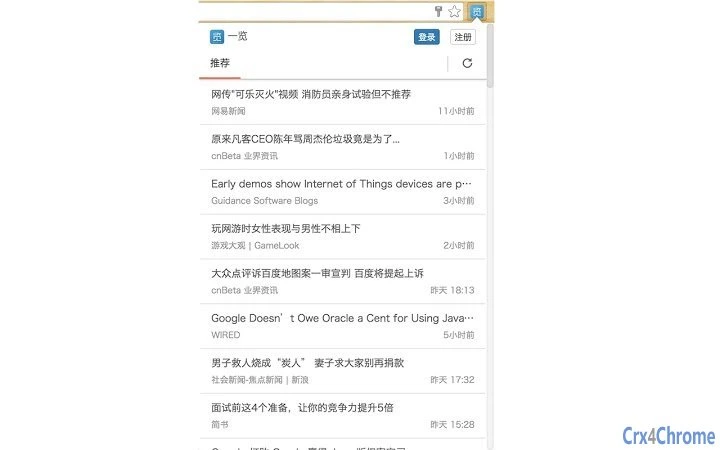
Users can subscribe to RSS feeds with a single click, thanks to automatic detection of feed links on current web pages. The application includes an internal recommendation engine that learns from user behavior, refining suggestions over time. This feature enhances content discovery, making it easier to find relevant articles based on past interactions. The tool supports access to recently updated posts, personalized recommendations, and organized subscription lists, streamlining the reading workflow.
While the developer’s background is not publicly available, the software is positioned as a cross-platform solution with support for Windows, Mac, and Linux. It is intended for individuals who value a consistent experience across devices and seek a unified space for managing digital content. Real-world use cases include daily news monitoring, academic research, content curation for blogs, and personal knowledge management.
Key Features & Capabilities
- Auto-Discover RSS Feeds – Automatically detects RSS links on visited web pages, allowing one-click subscription without manual URL entry.
- Personalized Content Recommendations – Uses an embedded recommendation engine that adapts to user preferences, improving suggestions over time based on reading history.
- Multi-Platform Sync – Supports synchronization across Web, iOS, and Android devices, ensuring a consistent reading experience regardless of the platform used.
- Article Management Tools – Allows users to save articles for later reading, organize them into collections, and share selected content with friends or on social media.
- Centralized Content Dashboard – Provides a unified interface to view recent updates, recommended articles, and subscribed feeds in one place.
These features collectively address the need for a streamlined content consumption workflow. For example, a researcher can quickly subscribe to academic blogs and receive tailored article suggestions. A content creator may use the tool to monitor industry trends and share highlights with their audience. The ability to save and recommend articles enhances collaboration and knowledge sharing. The integration of web, mobile, and desktop access ensures continuity, making it ideal for users who switch between devices throughout the day.
User Interface, Workflow & Performance
The user interface is structured to prioritize readability and ease of navigation. The main dashboard displays key content categories—recent updates, recommended articles, and subscribed feeds—organized in a clean, intuitive layout. Navigation is designed to minimize clicks, enabling users to access content with minimal friction. The workflow emphasizes speed: discovering feeds, saving articles, and sharing content are all streamlined through context-aware actions.
While specific performance metrics were not disclosed, the application is built to handle multiple feeds efficiently, with a focus on responsiveness. The developer did not specify resource usage details, such as CPU or RAM consumption. However, based on general software behavior, the tool is expected to operate smoothly on modern systems. Stability appears to be a design priority, as the application supports persistent data synchronization across platforms. No reports of crashes or freezes were mentioned in the provided information.
Compatibility & System Requirements
The software is compatible with Windows, Mac, and Linux operating systems, offering broad accessibility for desktop users. It is available in version 1.0.0 and has a file size of 12.5 MB, indicating a lightweight installation. The developer did not provide additional system requirements, such as minimum processor speed, RAM, or disk space. As a result, exact hardware compatibility cannot be confirmed beyond the listed platforms.
Installation is straightforward, with no complex setup steps described. The application is designed to function as a standalone desktop tool, integrating with the user’s existing browser and content ecosystem. Multi-platform sync is supported, allowing users to access their data from web browsers and mobile devices. However, the details of how this synchronization is implemented—such as cloud storage or server infrastructure—were not specified.
Pros and Cons
Pros
- Free to download and use with no hidden costs.
- Automatic RSS feed detection simplifies subscription setup.
- Personalized recommendations improve with continued use.
- Multi-platform sync ensures consistent access across devices.
- Lightweight design with a small installation size.
Cons
- System requirements were not fully disclosed.
- Performance details, such as CPU or memory usage, were not provided.
- Developer background is not publicly available.
- Exact synchronization mechanism is unclear.
- Limited information on offline functionality.
Is Smart RSS Reader available for Windows, Mac, and Linux?
Yes, the software is compatible with Windows, Mac, and Linux operating systems, providing broad desktop support.
Is the software free to use?
Yes, the application is completely free to download and use, with no subscription or premium tiers mentioned.
Can I sync my reading data across devices?
Yes, the tool supports synchronization across Web, iOS, and Android platforms, ensuring a consistent experience regardless of device.
Does the app require an internet connection?
While the application can function offline for viewing saved content, continuous syncing and recommendations require an active internet connection.
How often are updates released?
The software is currently at version 1.0.0, released on May 15, 2024. Update frequency is not specified in the available information.
Final Thoughts + CTA
Smart RSS Reader offers a compelling solution for users seeking a centralized, intelligent platform to manage online content. Its automatic feed discovery, personalized recommendations, and multi-platform sync set it apart from basic RSS tools. While some technical details remain undisclosed, the software delivers a clean, efficient experience tailored to modern readers. It is especially beneficial for professionals, students, and content curators who need to stay informed across multiple sources.
Despite limited information on system requirements and performance, the lightweight footprint and free availability make it accessible to a wide audience. The long-term value increases with use, as the recommendation engine becomes more accurate over time. For anyone looking to reduce browser clutter and improve content discovery, this tool is a strong candidate.
Download Smart RSS Reader now







